When you’re building or upgrading a gaming rig or a workstation, keeping your CPU cool isn't just about performance—it's about longevity, stability, and even the peace and quiet of your setup. Dive into the world of liquid cooling, and you'll quickly encounter All-in-One (AIO) coolers, particularly the popular 240mm and 360mm variants. Understanding AIO Cooling Basics: How 240mm and 360mm Liquid Coolers Function is key to making an informed choice, ensuring your valuable processor stays frosty even under the heaviest loads.
These self-contained liquid cooling systems have become a staple for enthusiasts and casual builders alike, offering a potent blend of efficiency, aesthetics, and user-friendliness. But what exactly makes a 240mm different from a 360mm, and how do they manage to tame scorching CPU temperatures? Let's break it down.
At a Glance: Your AIO Cooling Takeaways
- AIOs are self-contained liquid coolers: Offering a balance of performance, convenience, and aesthetics over traditional air coolers or complex custom loops.
- The core function: A pump moves coolant from a cold plate (on the CPU) to a radiator, where fans dissipate the heat into your case.
- 240mm vs. 360mm: These numbers refer to the radiator length, typically accommodating two 120mm fans (240mm) or three 120mm fans (360mm).
- Larger usually means better cooling: A 360mm radiator has more surface area for heat dissipation, translating to lower CPU temperatures or quieter operation at similar temps.
- Case compatibility is paramount: Always choose the largest AIO your PC case can physically accommodate. Small cases might fit a 120mm or 240mm, while full towers can handle 360mm or even 420mm.
- Cooling needs vary: Casual users can often get by with a 240mm, but high-end CPUs (like Intel 13th/14th Gen, AMD Ryzen 9000) or overclocking benefit greatly from a 360mm.
- Orientation matters: Mount the AIO so the pump is the lowest point in the loop to prevent air bubbles from accumulating in the pump, optimizing performance and reducing noise.
Demystifying AIO Coolers: What They Are and Why They Matter
In the quest for optimal PC performance, managing heat is a non-negotiable challenge. Your CPU, the brain of your computer, generates a significant amount of heat, especially when crunching numbers, rendering graphics, or powering intense gaming sessions. Left unchecked, this heat can lead to thermal throttling—where your CPU intentionally slows down to prevent damage—or even system instability.
Enter the All-in-One (AIO) liquid cooler. Unlike a custom liquid cooling loop, which involves sourcing individual components and a more intricate setup, an AIO comes pre-assembled, pre-filled, and sealed. Think of it as a plug-and-play solution for liquid cooling, making it far more accessible to the average PC builder.
The "Closed Loop" Advantage
The beauty of an AIO lies in its closed-loop design. Once manufactured, the coolant is sealed inside the system, meaning you never have to worry about filling, refilling, or maintaining fluid levels (unless there's a rare leak, which we'll touch on later). This inherent convenience is a major reason AIOs have surpassed custom loops in popularity for many users.
Why Liquid? A Quick Heat Transfer Lesson
Why bother with liquid when air coolers exist? It boils down to efficiency. Water (or specialized coolant) has a much higher specific heat capacity than air, meaning it can absorb and transfer significantly more heat energy per unit volume. This allows liquid coolers to move heat away from your CPU more effectively and transport it to a larger radiator surface for dissipation, often resulting in lower temperatures and the potential for quieter operation compared to many air coolers, especially under heavy loads.
While high-end air coolers have certainly become competitive in recent years, AIOs traditionally offer superior CPU temperatures and quieter fan noise, particularly when dealing with the most demanding CPUs or overclocking scenarios.
The Heart of the System: How AIOs Actually Work
An AIO cooler, whether 240mm or 360mm, operates on the same fundamental principles of heat transfer. It’s a beautifully engineered system designed to continuously move heat away from your CPU and expel it from your PC case.
Here's a breakdown of the key components and their roles:
The Cold Plate & Pump: Drawing Heat Away
Atop your CPU, you'll find the CPU block—a small, often decorative, housing that contains two critical elements:
- The Cold Plate: This is a flat, highly conductive copper base that makes direct contact with your CPU's integrated heat spreader (IHS). A thin layer of thermal paste sits between them, maximizing heat transfer. As your CPU heats up, its heat is rapidly transferred to this cold plate.
- The Pump: Located within the CPU block (or sometimes inline with the tubing), the pump is the engine of the AIO. It continuously circulates the coolant through the system. Warm coolant from the cold plate is pushed towards the radiator, while cooler coolant is drawn back towards the CPU.
This entire block is secured to your motherboard, ensuring firm contact for efficient heat transfer.
The Radiator: Dissipating Heat
Connected to the CPU block via tubing is the radiator. This component looks much like a miniature car radiator, made up of a series of thin metal fins and channels. Here’s what happens:
- Warm Coolant Arrives: The coolant, now carrying the heat absorbed from the CPU, flows into the radiator.
- Heat Transfer: The heat from the coolant transfers to the metal fins of the radiator. These fins are designed to maximize surface area, making them highly efficient at radiating heat.
- Airflow is Key: This is where the fans come in.
The Fans: Moving Air (and Noise)
Mounted directly to the radiator are one or more fans. Their job is straightforward: pull cool air from outside the radiator and push it through the fins (or vice-versa, depending on your fan orientation).
- Forced Convection: As air passes over the heated fins, it picks up the heat and carries it away, expelling it from the radiator and ideally, out of your PC case.
- Noise vs. Performance: The speed at which these fans spin directly impacts how much air they move and, consequently, how effectively they cool. Faster speeds mean more noise, while slower speeds are quieter but offer less aggressive cooling. This is a critical balance to strike when choosing and configuring your AIO.
The Tubing: Completing the Loop
Durable, flexible tubing connects the CPU block to the radiator, forming a continuous, sealed loop. This tubing allows the coolant to flow freely between the two main components, ensuring the cycle of heat absorption and dissipation continues uninterrupted. Most modern AIOs use robust, reinforced tubing designed to withstand years of use without kinking or leaking.
240mm vs. 360mm: Understanding the Size Difference
When you hear "240mm" or "360mm" in the context of AIO coolers, you're primarily referring to the length of the radiator. This measurement dictates how many standard 120mm fans the radiator can accommodate, which is the key differentiator in their cooling potential.
What Do "240mm" and "360mm" Really Mean?
- 240mm AIO: This radiator is designed to fit two 120mm fans side-by-side. The "240" comes from 2 x 120mm = 240mm. It's a common size that offers a significant upgrade over 120mm single-fan AIOs and often finds a sweet spot between performance and case compatibility.
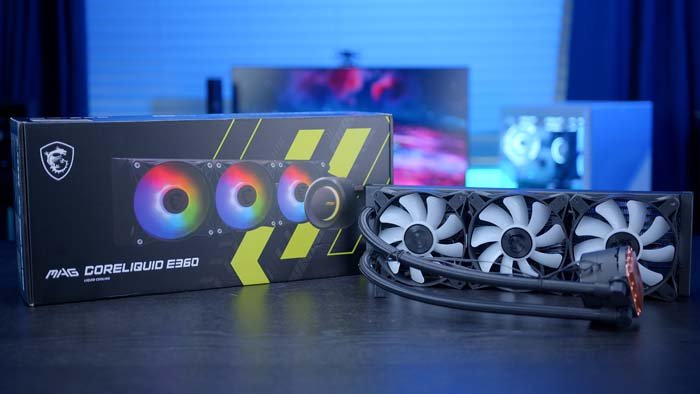
- 360mm AIO: This radiator is built to accommodate three 120mm fans in a row. The "360" comes from 3 x 120mm = 360mm. It's a larger, more powerful option, often reserved for high-performance builds where maximum heat dissipation is paramount.
Less common sizes include 120mm (one 120mm fan), 140mm, 280mm (two 140mm fans), and 420mm (three 140mm fans). Generally, a larger radiator offers greater cooling potential, but thickness, materials, and fan/pump performance also significantly impact cooling and noise.
Cooling Capacity: More Surface Area, More Heat Dissipation
The most direct impact of a larger radiator is its increased surface area.
- 240mm: With two fans and a decent surface area, a 240mm AIO can effectively cool most mid-range to high-end CPUs, even with some light overclocking. It's a fantastic starting point for improved temperatures and quieter fans compared to many stock air coolers.
- 360mm: By adding a third fan and extending the radiator, a 360mm AIO provides significantly more surface area for heat exchange. This translates directly to superior cooling performance. For demanding CPUs (like Intel 13th/14th Gen or AMD Ryzen 9000 series) or serious overclocking, a 360mm cooler is highly recommended. It can maintain even lower CPU temperatures under extreme loads, preventing thermal throttling and unlocking more stable performance.
If you're still on the fence about the performance difference, a detailed look at specific performance benchmarks can shed light on whether the extra cost and size of a 360mm cooler is worth it for your specific setup.
The Noise Equation: Bigger Often Means Quieter
This might seem counterintuitive, but larger radiators often allow for quieter operation. Here's why:
- More Surface Area, Slower Fans: Because a 360mm radiator has more surface area to dissipate heat, its fans don't have to spin as fast to achieve the same cooling performance as a smaller 240mm radiator.
- Lower RPM, Less Noise: Fans spinning at lower RPMs generate less noise. So, while a 360mm AIO has three fans compared to a 240mm's two, the individual fans can often run slower and quieter, leading to a more pleasant acoustic experience overall, especially during general use or lighter gaming. This benefit becomes even more pronounced with larger 280mm or 420mm radiators.
Choosing Your AIO: The Crucial Factors
Selecting the right AIO isn't just about picking the biggest or most expensive one. It's about finding the sweet spot that balances performance, noise, budget, and—most importantly—physical compatibility with your PC case.
Case Compatibility: The Golden Rule
This is, without a doubt, the most critical factor. No matter how powerful an AIO is, it's useless if it doesn't fit inside your case. The general rule of thumb is simple: get the largest size that fits your PC case.
- Small Cases (Mini-ITX, Micro-ATX): These compact builds often have limited space. You'll typically be looking at 120mm or 240mm radiators. For instance, a CORSAIR Hydro H60x (120mm) is a viable option if space is extremely tight, often fitting in a rear exhaust fan slot. Some smaller Micro-ATX cases might squeeze in a 240mm in the front or top.
- Mid-Tower Cases: This is the most common case size, offering more flexibility. Here, 240mm or 280mm radiators are popular choices, balancing performance and noise effectively. Models like the CORSAIR iCUE LINK TITAN 240 RX or iCUE LINK H115i are excellent examples, often mountable in the front or top of the case.
- Full-Tower Cases: These giants offer the most room. A 360mm radiator, such as the iCUE LINK TITAN 360 RX, is a prime choice for top-tier cooling performance, usually fitting comfortably in the front or top. Some very large full-tower cases may even accommodate a 420mm radiator, providing ultimate cooling potential.
Always check your case manufacturer's specifications for radiator mounting points and maximum clearance before purchasing an AIO.
Your CPU's Demands: Matching Power to Cooling
Different CPUs generate different amounts of heat, influencing the cooling power you need.
- Casual Users & Modest Rigs: If you're running a non-flagship CPU and don't plan on overclocking, a 240mm or even a high-quality 120mm AIO (mountable in a rear exhaust slot) may be perfectly sufficient. They'll keep your CPU cool and quiet during everyday tasks and most gaming.
- Overclocking & Resource-Heavy Tasks: For the latest, most demanding CPUs—think Intel 13th/14th Gen or AMD Ryzen 9000 series—and for anyone looking to push their processor with overclocking or resource-heavy tasks like video editing or streaming, a 360mm cooler is highly recommended. It offers the thermal headroom needed to prevent throttling and maintain peak performance.
- The Rise of Efficiency: Interestingly, newer generations of processors, such as Intel Core Ultra Desktop Processors (Arrow Lake S), are generally designed to be more efficient. This means they might not require the same extreme cooling solutions as previous generations like Raptor Lake, potentially allowing you to achieve excellent results with a 280mm or even a high-performing 240mm AIO.
Noise Levels: Finding Your Quiet Zone
For many, a quiet PC is as important as a cool one. As mentioned, larger radiators (280mm, 360mm, 420mm) generally run quieter because their fans can spin slower to achieve the desired cooling. If silence is golden to you, investing in a larger AIO can be a worthwhile decision, provided it fits your case.
Future-Proofing Your Rig
If you plan to upgrade your CPU in the future to a more powerful model or explore overclocking, it's wise to consider a 280mm or 360mm cooler now. This foresight can save you from having to purchase a new cooler down the line, ensuring you have ample cooling capacity for future performance aspirations.
Installation Best Practices: Getting It Right
Even the best AIO can underperform if not installed correctly. Two critical aspects deserve your attention:
AIO Orientation: Pump Low, Radiator High
This is a common point of confusion, but crucial for longevity and performance. You should generally mount your AIO so that the pump (located in the CPU block) is at the lowest point of the entire liquid cooling loop.
Why? Air. Over time, a small amount of air can enter the liquid loop. If the pump is the highest point, air bubbles will naturally collect there, causing the pump to run dry, create gurgling noises, and significantly reduce its lifespan and cooling efficiency. By having the pump at the lowest point, any accumulated air will rise to the highest point of the radiator, away from the pump's impeller, where it won't interfere with the liquid flow.
So, if you mount your radiator in the front of the case, ensure the tubes exit the bottom of the radiator. If mounted at the top, this is naturally achieved as the pump will be below the radiator.
Thermal Paste: The Unsung Hero
Don't underestimate the importance of good thermal interface material (TIM), commonly known as thermal paste. This paste fills microscopic imperfections between your CPU's IHS and the cold plate of your AIO, creating a seamless pathway for heat transfer.
Most AIO coolers come with thermal paste either pre-applied to the cold plate or included in a syringe. Ensure you apply it correctly (usually a pea-sized dot in the center for most CPUs) and avoid using too much or too little. A good application ensures efficient heat transfer from your CPU to the cooler.
Top AIO Coolers: Noteworthy Models for Every Need
The AIO market is vibrant, with manufacturers constantly innovating. While specific models can vary in performance based on your CPU and case, here are some standout options highlighted by experts, covering 240mm, 360mm, and even a few others that push boundaries:
- Arctic Liquid Freezer III Pro (360mm): Consistently praised for delivering the lowest CPU temperatures, especially with high-end AMD and Intel CPUs. Be aware of its thick 63mm radiator, which might not fit all cases. Its competitive price often makes it a performance-per-dollar champion. Intel users will benefit from the included contact frame.
- Thermalright Grand Vision 360: Offers excellent performance and remarkable value, often featuring an integrated LCD screen for customization without compromising cooling power.
- ID-Cooling FX360 INF (360mm): A budget-friendly option that doesn't skimp on performance. It provides solid cooling, often quiet operation (around 40.9 dBA during gaming), and comes with RGB fans and an infinity mirror design for aesthetics.
- Silverstone IceMyst 360 (and 240mm): An innovative design that allows for additional fans to be mounted around the CPU block. These extra fans can actively cool surrounding components like VRMs, RAM, and SSDs, making it a comprehensive cooling solution. It performs very quietly when noise-normalized.
- Lian Li Galahad II Trinity Performance 240: This model is a testament to how far 240mm AIOs have come. It often ranks as the best-cooling 240mm AIO available, sometimes even outperforming larger 360mm units. It's quiet in most workloads and reasonably priced, making it an excellent choice for those with limited space but high performance demands.
- Cooler Master MasterLiquid 240 Atmos: An impressive 240mm AIO capable of keeping demanding CPUs like the Intel i7-13700K below peak temperature in heavy workloads, all while maintaining low noise levels. It boasts good packaging, RGB lighting, a 5-year warranty, and long-lifespan components.
- Enermax LiqMaxFlo SR 120mm: For extremely compact systems where even a 240mm won't fit, this 120mm AIO provides the best balance of cooling, quiet operation, and price. Its unique block-mounted RGB fan also helps airflow around VRMs and RAM.
- Lian Li Galahad II LCD 280 / Corsair iCUE H170i Elite LCD XT (420mm): While outside the 240mm/360mm focus, these represent top-tier options for extreme performance. The Galahad II LCD 280 offers 360mm-level performance in a more case-compatible size, while the Corsair H170i Elite LCD XT is for those seeking ultimate cooling for CPUs like the Intel i9-13900K, albeit at a premium price.
Remember that performance can vary slightly based on your specific CPU, case airflow, and even ambient room temperature. Always check up-to-date reviews and benchmarks when making a final decision.
Common AIO Questions & Misconceptions
Let's clear up some common thoughts and worries around AIO coolers.
Are AIOs always better than air coolers?
Not always. While AIOs traditionally offer better raw cooling performance, especially for high-end CPUs and overclocking, the gap has narrowed significantly. Top-tier air coolers (like the Noctua NH-D15 or DeepCool AK620) can compete with or even outperform some 240mm AIOs, often at a lower price and with zero pump noise. However, AIOs generally maintain their edge for the very hottest CPUs and aesthetic preferences.
Do AIOs leak? Is it a common problem?
While liquid and electronics sound like a terrifying combination, modern AIOs are incredibly reliable and leaks are extremely rare. They undergo rigorous testing and are built with robust, factory-sealed components. If a leak does occur, it's typically due to manufacturing defects (usually caught early) or physical damage during installation or handling. Most reputable brands offer warranties that cover not only the cooler but also potential damage to other components in the rare event of a leak.
How long do AIOs last?
The lifespan of an AIO cooler is generally quite good, with most users expecting 5-7 years of reliable performance, and often longer. The pump is usually the first component to fail. Factors like pump quality, operating temperature, and continuous high-load usage can influence longevity. Many manufacturers offer warranties ranging from 3 to 6 years, giving you peace of mind.
Making Your Decision: Beyond the Basics
You're now equipped with the fundamental knowledge of how 240mm and 360mm AIO liquid coolers function. Choosing the right one for your build comes down to a careful consideration of a few key factors:
- Case Compatibility: This is your primary filter. Measure your case, check its specifications, and determine the largest radiator size it can accommodate. Don't force a larger AIO if it means sacrificing optimal fan placement or airflow.
- CPU Demands: Assess your processor. Are you running a power-hungry flagship CPU? Do you plan to overclock? If so, a 360mm (or even 280mm/420mm) AIO will provide the thermal headroom you need. For more modest CPUs or general use, a well-performing 240mm or even 120mm might be perfectly adequate.
- Noise Preference: If you crave a silent PC, leaning towards a larger radiator (like a 360mm) can allow its fans to spin slower and quieter for a given temperature target.
- Budget & Aesthetics: AIOs can range widely in price, with features like LCD screens, addressable RGB, and thicker radiators adding to the cost. Factor in what you're willing to spend and what visual style you prefer for your build.
Ultimately, a good AIO cooler is an investment in your PC's health and performance. By understanding the mechanics and carefully considering your specific needs, you'll be able to confidently select a liquid cooler that keeps your system running cool, quiet, and stable for years to come.