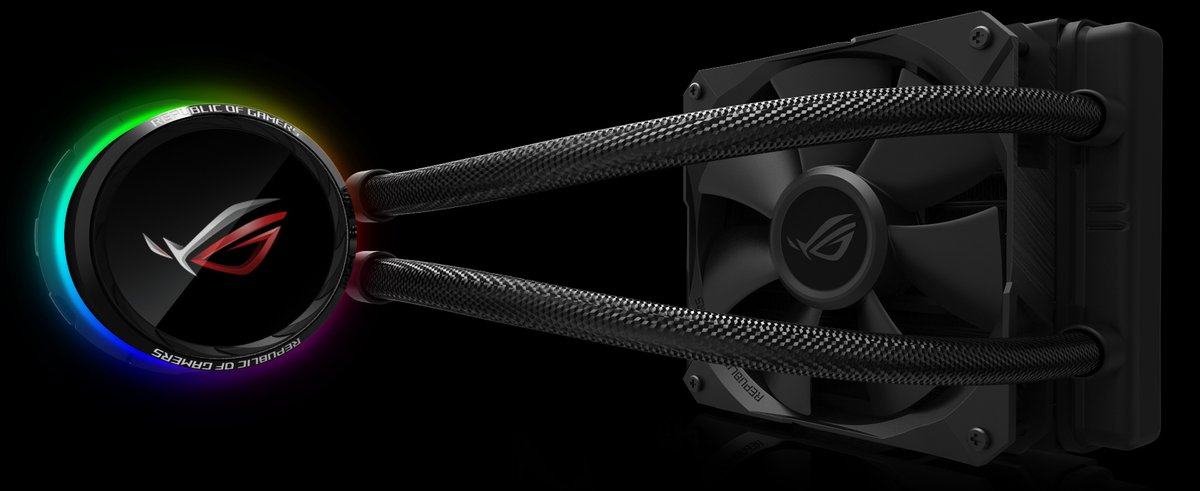
Building a new PC, or upgrading an old one, is a thrill. You're piecing together raw power, a testament to modern engineering. But as you navigate the myriad of components, one critical decision often gets underestimated: ensuring perfect CPU & Case Compatibility: Choosing the Right AIO Size for Your PC Build. Get this wrong, and you're looking at thermal throttling, frustrating installations, or worse – components that simply don't fit. Get it right, and your CPU will purr under pressure, your case will look immaculate, and your system will deliver peak performance for years to come.
This isn't just about cramming parts into a box; it's about creating a harmonious ecosystem where heat is efficiently managed, and every component has room to breathe. Today, we're diving deep into the art and science of selecting the ideal All-in-One (AIO) liquid cooler for your CPU, meticulously matched to your chosen PC case.
At a Glance: Your AIO Sizing Checklist
- Know Your CPU's Needs: High-end CPUs (i9/Ryzen 9) demand larger AIOs (360mm), while mainstream chips (i5/Ryzen 5) often thrive on 240mm.
- Inspect Your Case Specs: Crucial for understanding radiator mounting points (top, front, rear) and maximum supported sizes.
- Account for Component Clearance: RAM height and GPU length are often overlooked, especially with front-mounted radiators.
- Prioritize Airflow: Consider how your AIO fans will work with your case's overall airflow strategy (intake vs. exhaust).
- Don't Overspend: A larger AIO isn't always necessary. Match the cooler to your CPU's actual thermal demands and your budget.
The Unsung Hero: Why Your AIO's Size Matters (More Than You Think)
For many enthusiasts, an All-in-One (AIO) liquid cooler is the gold standard for CPU thermals. It's a self-contained unit, simpler than a custom loop, yet often outperforming traditional air coolers, especially when dealing with high-performance CPUs or overclocking. An AIO works by circulating coolant through a cold plate that sits on your CPU, absorbing heat. This heated coolant then travels to a radiator, where fans push air through fins to dissipate the heat, returning cooled liquid to the CPU.
The size of that radiator is paramount. It directly dictates the surface area available to shed heat. More surface area generally means better cooling potential. But that larger radiator needs to physically fit inside your PC case, and sometimes it competes for space with other critical components like your graphics card or RAM. This delicate dance between CPU thermal demands, AIO cooling capacity, and case real estate is where the "compatibility" comes into play.
Decoding Your Case: Form Factors and Cooling Real Estate
Your PC case isn't just a fancy shell; it's the foundation for your entire build, dictating what fits and how well it cools. Understanding its form factor and internal layout is the first crucial step in AIO compatibility.
Mid-Tower: The Versatile Champion
For most PC builders, the mid-tower case is the go-to choice. It offers a superb balance of size, expandability, and cooling potential. You'll typically find support for ATX motherboards, ample space for modern graphics cards, and—most importantly for our discussion—multiple radiator mounting options.
- Common AIO Support: Most mid-towers can accommodate 240mm or 280mm radiators, often in both the front and top panels. Many larger mid-towers will also support 360mm radiators in the front, and some even at the top.
- Considerations: With a front-mounted AIO, pay close attention to the clearance between the radiator/fans and your graphics card. A long GPU combined with a thick AIO can lead to a tight squeeze or even incompatibility. Top mounts are generally safer for GPU clearance but might interfere with tall RAM heatsinks or motherboard VRM heatsinks.
Full-Tower: Space for the Most Ambitious Builds
If you're planning an extreme high-performance system, multiple GPUs, extensive storage, or a custom liquid cooling loop, a full-tower case provides unparalleled space. These behemoths are designed for maximum expandability and cooling.
- Common AIO Support: Full-towers almost universally support 360mm radiators, often in both front and top positions. Some even extend to 420mm radiators, offering the absolute best AIO cooling potential.
- Considerations: While space is rarely an issue, ensure your specific full-tower still allows for ideal airflow configuration once your massive AIO is installed. The sheer size can make cable management a longer task, though the extra room usually makes it easier to route cleanly.
Mini-ITX: The Compact Challenge
For those who prioritize a small footprint, Mini-ITX cases are incredibly appealing. They're sleek, portable, and can house surprisingly powerful components. However, this compactness comes with significant trade-offs in terms of cooling and expandability.
- Common AIO Support: Many Mini-ITX cases can only fit a 120mm AIO in the rear exhaust position, or a 240mm radiator in the top or front, depending on the case design (e.g., "shoebox" or "console" style). Some innovative designs push the limits, but you'll always be more constrained.
- Considerations: Every millimeter counts. You need to meticulously check the case's specifications for maximum CPU cooler height (for air coolers, if you change your mind) and, critically, maximum radiator length and thickness. RAM height and GPU length are even more critical here. You're typically making compromises between CPU cooling and GPU power, or system noise.
Crucial Case Dimensions: Beyond the Form Factor
When poring over case specifications, don't just look at the form factor. Dig deeper for these vital details:
- Radiator Mounting Points: Does it support top, front, or rear radiators? What sizes (120mm, 140mm, 240mm, 280mm, 360mm, 420mm) are supported in each location?
- Radiator Thickness: Some cases have limited clearance, meaning a standard 27mm thick radiator will fit, but a "thick" 38mm or 45mm radiator won't, especially when factoring in fans.
- CPU Cooler Clearance: Even with an AIO, this spec is useful as an indicator of general space above the CPU socket.
- Graphics Card Length: Especially important for front-mounted radiators. The combined length of the radiator, fans, and GPU must fit comfortably.
- RAM Height: A top-mounted AIO can sometimes conflict with tall RAM heat spreaders. Check the clearance.
- Motherboard Tray Cut-outs & Cable Management: Good cable management isn't just for looks; it improves airflow, which indirectly helps your AIO.
AIO Radiator Sizes: Matching Power to Space
Once you understand your case's capabilities, it's time to choose the right AIO. Radiators are measured by the total length of the fan mounting points. Common sizes are 120mm, 240mm, 280mm, 360mm, and 420mm.
120mm AIOs: The Entry Point
- Best For: Modest CPUs (e.g., Intel Core i3, AMD Ryzen 3, or non-K/X series i5/Ryzen 5), compact builds, or as an upgrade from a stock cooler where space is extremely limited.
- Cooling Power: Provides adequate cooling for lower-TDP CPUs under general workloads. Can struggle with sustained loads or any form of overclocking on higher-end chips.
- Placement: Typically mounted as a rear exhaust fan.
- Considerations: While compact and affordable, the cooling performance is limited. Avoid for serious gaming or content creation builds with mid-to-high-end CPUs.
240mm AIOs: The Sweet Spot
- Best For: Mainstream CPUs (e.g., Intel Core i5, Core i7, AMD Ryzen 5, Ryzen 7), gamers, content creators, and light-to-moderate overclocking.
- Cooling Power: Offers a significant leap in performance over 120mm AIOs, providing excellent cooling for most modern CPUs under typical loads. It's often the best balance of performance, cost, and compatibility.
- Placement: Commonly mounted at the top (exhaust) or front (intake). Top mounting is often preferred as it exhausts hot air directly out of the case and keeps the AIO pump below the highest point of the radiator, which helps prevent air bubbles from collecting in the pump.
- Considerations: This size is highly versatile and fits in the majority of mid-tower cases. It's a fantastic all-rounder.
280mm AIOs: The Quiet Achiever
- Best For: Similar to 240mm but with slightly better performance, often achieving it with lower fan speeds (and thus less noise) because the 140mm fans move more air per revolution. Good for users prioritizing quiet operation without sacrificing much cooling power.
- Cooling Power: Generally outperforms 240mm AIOs due to larger 140mm fans and radiator surface area.
- Placement: Usually top or front. Requires cases that support 140mm fan mounts (2x140mm).
- Considerations: Not all cases support 2x140mm fan mounts where they might support 3x120mm or 2x120mm. Double-check your case specs carefully.
360mm AIOs: The Performance King
- Best For: High-end systems, top-tier CPUs (e.g., Intel Core i9, AMD Ryzen 9, particularly those with high core counts), and serious overclocking.
- Cooling Power: Provides maximum cooling performance for the most demanding processors, ensuring stable temperatures even under extreme loads.
- Placement: Most often front-mounted (intake) or top-mounted (exhaust) in larger mid-tower or full-tower cases.
- Considerations: Requires substantial case space. Front mounting means you need to ensure ample GPU clearance. Top mounting demands good clearance from RAM and motherboard heatsinks. This is the choice when performance is paramount and budget/space are less restrictive.
For a deeper dive into the performance differences between common sizes, it's worth exploring the nuances of Choosing between 240 and 360 cooling.
Radiator Thickness: An Often Overlooked Detail
While radiator length (120mm, 240mm, etc.) gets most of the attention, radiator thickness also impacts cooling performance and compatibility.
- Standard (27-30mm thick): Most common, fits in a wide range of cases.
- Thick (38mm+ thick): Offers enhanced cooling performance due to more coolant volume and surface area. However, these require more clearance, potentially clashing with motherboard components, RAM, or the graphics card. Always confirm your case's specific "radiator thickness" support if considering a thick AIO.
CPU Demands: How Much Cooling Does Your Processor Really Need?
The heart of your decision lies with your CPU. Different processors generate vastly different amounts of heat, measured by their Thermal Design Power (TDP). This isn't an exact measure of power draw, but it's a good indicator of how much heat your cooler needs to dissipate.
- Low to Mid-Range CPUs (65W-95W TDP): Think Intel Core i3, Core i5 (non-K), AMD Ryzen 3, Ryzen 5 (non-X). These CPUs generally don't run extremely hot unless heavily stressed or in very warm environments.
- Recommended AIO: A quality 120mm AIO can suffice for these if space is tight, but a 240mm AIO offers a significant thermal headroom, allowing for quieter operation and better longevity.
- Mid to High-End CPUs (95W-125W TDP): This includes unlocked Intel Core i5 (K-series), Core i7 (non-K), AMD Ryzen 5 (X-series), Ryzen 7 (non-X). These are popular for gaming and productivity.
- Recommended AIO: A 240mm or 280mm AIO is the sweet spot here. It provides excellent cooling for typical loads and even moderate overclocking without breaking the bank or demanding excessive case space.
- Enthusiast & High-Core Count CPUs (125W+ TDP): This is where Intel Core i7 (K-series), Core i9, AMD Ryzen 7 (X-series), Ryzen 9 truly shine—and generate serious heat. These chips often boost to very high clock speeds and can pull a lot of power, especially under sustained multi-core loads or aggressive overclocking.
- Recommended AIO: A 360mm or 280mm AIO is strongly recommended for these CPUs. If you plan heavy overclocking or sustained, multi-core tasks (e.g., video rendering, streaming, scientific computing), a 360mm is generally the better choice to keep temperatures in check and performance stable.
Overclocking Considerations: When you overclock a CPU, you're intentionally pushing it beyond its factory specifications, which generates even more heat. If you plan to heavily overclock, always err on the side of a larger AIO (e.g., 360mm for high-end chips, 280mm for mid-range).
The Compatibility Blueprint: Your Step-by-Step Selection Process
Let's distill this into an actionable plan to ensure flawless AIO and case compatibility.
Step 1: Identify Your CPU's Thermal Needs & Intended Use
Before you even look at cases or coolers, understand what your CPU demands.
- Check CPU TDP: Look up the official TDP for your specific CPU model. This is your baseline.
- Define Your Use Case: Are you building a light office PC, a dedicated gaming rig, a professional content creation workstation, or an extreme overclocking machine? The more demanding the use, the more cooling power you'll need. A gamer playing for a few hours will have different thermal spikes than a video editor rendering for eight hours.
Step 2: Scope Out Your Case: The Layout is Key
Now that you know your CPU's needs, find a case that can meet them.
- Research Case Radiator Support: Every reputable case manufacturer provides detailed specifications. Look for the "Radiator Support" section. It will list sizes (e.g., "Top: 240mm, 280mm; Front: 240mm, 280mm, 360mm; Rear: 120mm").
- Note All Potential Locations: Which mounting points offer the sizes you need? Prioritize top and front mounts for larger AIOs.
- Measure Internal Clearance: If you can, find reviews or videos that specifically show an AIO installed in your target case. Look for mentions of RAM height clearance, GPU length clearance, and radiator thickness limitations. This is especially vital for Mini-ITX or compact mid-towers.
Step 3: Cross-Reference Radiator & Case: Making the Match
With your CPU's needs and case's capabilities in hand, it's time to choose the AIO.
- Match AIO Size to CPU Demands & Case Support:
- CPU needs 240mm? Case supports 240mm top/front? Great, a 240mm AIO is a strong candidate.
- CPU needs 360mm? Case supports 360mm front/top? Excellent, consider a 360mm AIO.
- What if your CPU needs a 360mm AIO, but your case only supports up to 240mm? You have two choices: get a different case that supports a 360mm, or choose a less powerful CPU that a 240mm AIO can adequately cool. Don't compromise your cooling for a case you like.
- Consider Radiator Thickness: If you found a case with tight clearances, stick to standard thickness AIOs (around 27-30mm). If you have abundant space, a thicker radiator could offer a slight performance edge.
Step 4: Account for Other Components: The "Hidden" Obstacles
This is where many first-time builders encounter issues.
- RAM Clearance: If you're planning a top-mounted AIO, ensure your RAM's height (especially if it has tall RGB or heatsinks) won't collide with the AIO radiator or fans. Some motherboards have very little clearance between the CPU socket and the top edge of the board.
- GPU Length: This is critical for front-mounted AIOs. The radiator and its fans take up space at the front of the case, reducing the maximum GPU length. Always calculate:
Case Max GPU Length - (Radiator Thickness + Fan Thickness) = New Max GPU Length. A standard radiator (27mm) plus two standard fans (25mm each) means you lose about 52mm of GPU length. - Motherboard VRM Heatsinks: Less common with standard AIOs, but some very large AIO pump blocks or specific radiator mounting can interfere with oversized motherboard VRM heatsinks. This is rare but worth a quick visual check if possible.
Step 5: Fan Orientation and Airflow: Breathing Room for Your System
Your AIO fans are part of your case's overall airflow system.
- Intake vs. Exhaust:
- Intake: Fans pull cooler ambient air from outside the case, through the radiator, and into the case. This gives the CPU the coolest possible air, but it means warmer air is then circulated inside the case for other components. Often used for front-mounted AIOs.
- Exhaust: Fans push warmer air from inside the case, through the radiator, and out of the case. This helps overall case temperature but means the AIO is cooling the CPU with already-warmed internal air. Often used for top or rear-mounted AIOs.
- Balanced Airflow: Aim for a balance of intake and exhaust fans. A common setup: Front intake (potentially with AIO), Rear exhaust, Top exhaust (potentially with AIO).
- Positive vs. Negative Pressure:
- Positive Pressure: More intake than exhaust. Pushes air out of all gaps, reducing dust buildup.
- Negative Pressure: More exhaust than intake. Pulls air in through all gaps, potentially increasing dust.
- Most builders aim for slightly positive pressure.
Beyond the Basics: Optimizing AIO Performance
Getting the right size and fit is step one. Step two is making sure it performs at its best.
Thermal Paste: Don't Skimp on the Contact
Most AIOs come with pre-applied thermal paste, which is often sufficient. However, for enthusiasts or those seeking every degree of cooling performance, high-quality aftermarket thermal paste can provide a marginal but noticeable improvement.
- Application: A pea-sized dot in the center of the CPU integrated heat spreader (IHS) is generally the best method. The pressure from the cold plate will spread it evenly.
Fan Curves and Pump Speeds: The Software Advantage
Every modern AIO comes with software that allows you to control fan and pump speeds.
- Fan Curves: Experiment with custom fan curves. You can set fans to spin faster at higher CPU temperatures and slower when idle. Find a balance between cooling performance and noise. Often, fans can remain very quiet until the CPU hits 50-60°C, then ramp up.
- Pump Speed: The pump typically benefits from running at a constant, high speed (e.g., 70-100%). It's not usually the primary source of noise, and a steady flow of coolant is vital. Only reduce pump speed if noise is a major issue and temperatures remain well within limits.
Cable Management: More Than Just Aesthetics
Good cable management isn't just for a clean look; it contributes to better airflow by keeping wires out of the path of fans and open spaces. This allows your AIO to work more effectively. Utilize motherboard tray cut-outs, tie-off points, and rubber grommets.
Room Environment: Your PC Isn't in a Vacuum
The ambient temperature of your room directly impacts your AIO's effectiveness. A cooler room means cooler intake air, leading to lower CPU temperatures. Ensure your PC isn't crammed into a corner or cabinet where airflow is restricted; give it some breathing room. Dust radiator fins regularly for optimal performance.
Common Pitfalls and How to Avoid Them
Even with careful planning, mistakes can happen. Here are some frequent errors to watch out for:
- Buying Too Big (or Too Small):
- Too Big: Leads to wasted money, compatibility headaches (especially with GPU/RAM), and often doesn't provide significantly better cooling for a modest CPU.
- Too Small: Leads to thermal throttling, reduced CPU performance, and potentially shorter component lifespan for high-end chips.
- Avoid: Match the AIO size to your CPU's TDP and your case's validated support.
- Forgetting RAM Clearance: A top-mounted AIO with oversized RAM sticks is a common rookie mistake.
- Avoid: Check case specs for top radiator clearance with RAM. If unsure, opt for low-profile RAM or a front-mounted AIO (while still minding GPU clearance).
- Ignoring GPU Length with Front-Mounted AIOs: The radiator and fans will eat into your available GPU space.
- Avoid: Do the math:
Max Case GPU Length - AIO (radiator + fans) thickness. Ensure your chosen GPU is shorter than this new maximum. - Subpar Airflow: An AIO works best in a case with good overall airflow. Cases with solid front panels and limited ventilation can starve your fans of cool air.
- Avoid: Prioritize cases with mesh front panels or ample ventilation. Ensure you have a balanced intake/exhaust fan setup.
- "AIOs Always Outperform Air Coolers": While often true for high-end CPUs, top-tier air coolers can compete with smaller AIOs (120mm/240mm) and even sometimes outperform them, especially in terms of noise levels, and without the rare risk of leaks.
- Avoid: Evaluate high-end air coolers as an alternative if you're not pushing a Core i9/Ryzen 9, prioritizing simplicity and no leak risk.
Frequently Asked Questions (FAQs)
Can I use a 120mm AIO for an Intel Core i9 or AMD Ryzen 9?
While technically you can install it, it's strongly not recommended. A 120mm AIO will struggle to keep high-end, high-TDP CPUs like an i9 or Ryzen 9 cool under load, leading to severe thermal throttling and reduced performance. You'll need at least a 280mm or, preferably, a 360mm AIO for these processors.
Does a thicker radiator always mean better cooling?
Generally, yes, a thicker radiator (e.g., 38mm vs. 27mm) provides more surface area and coolant volume, which can lead to better heat dissipation. However, the gains are often incremental and come with compatibility challenges, as thicker radiators require more clearance. For most users, a standard thickness 240mm or 360mm AIO is sufficient.
Where should I mount my AIO radiator (top, front, rear)?
- Top Mount (Exhaust): Often preferred as it exhausts hot air directly out of the case. Also helps prevent air bubbles from collecting in the pump by keeping the pump below the highest point of the radiator.
- Front Mount (Intake): Draws in cooler ambient air for the CPU, but this can warm the air inside your case for other components. Be mindful of GPU clearance.
- Rear Mount (Exhaust): Typically only for 120mm AIOs. Good for compact builds or supplementing existing airflow.
The best orientation ultimately depends on your specific case, other components, and overall desired airflow.
Are AIOs noisy?
AIOs can be quieter than air coolers at idle, as the pump makes minimal noise, and fans can spin slowly. However, under load, the fans will ramp up, and some pumps can be audible. Noise levels vary significantly between models. Look for AIOs with low dBA fan ratings and fluid dynamic bearings (FDB) for quieter operation. Utilizing custom fan curves in software is key to balancing cooling and noise.
Making Your Final Decision: Confidence in Cooling
Choosing the right AIO for your PC build involves more than just picking the biggest or most expensive option. It's a thoughtful process of balancing your CPU's thermal demands, your case's physical limitations, and your personal performance and aesthetic goals.
Start by clearly defining your CPU's cooling requirements, then meticulously research your chosen PC case for its radiator compatibility in all available mounting positions. Factor in potential clashes with your RAM and GPU. Only then should you select an AIO size that meets both your performance needs and your case's capabilities.
With this comprehensive guide, you're now equipped to make an informed, confident decision. Build smart, build cool, and enjoy the fruits of a perfectly compatible system!